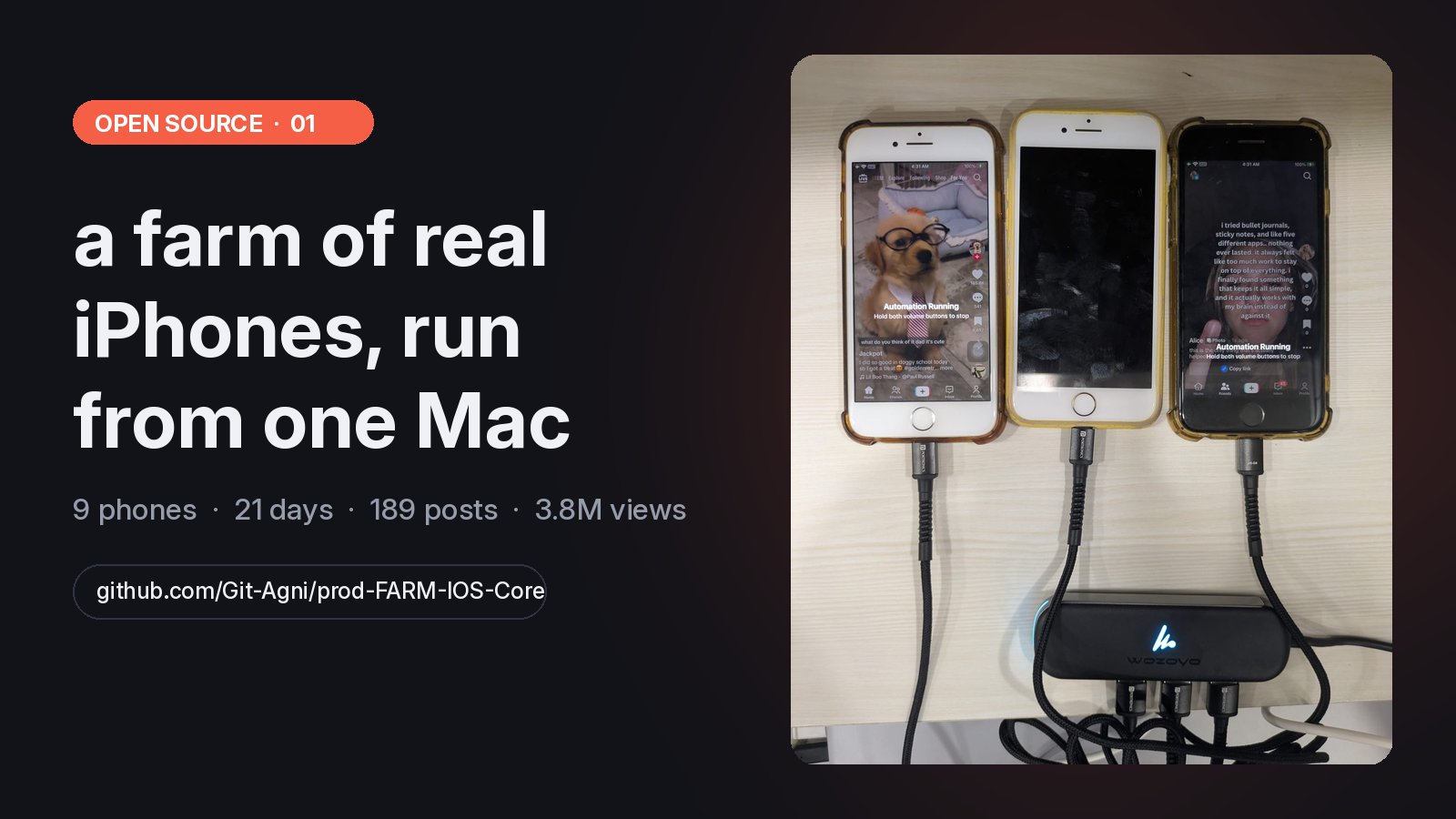
iOS Farm is a free, open source (Apache-2.0) iPhone farm. It runs real iPhones from one Mac, streams each screen to your browser and schedules TikTok posts and scroll sessions, with no jailbreak. In a 21 day test, nine used iPhone 8s on it posted 189 TikToks for 3.8M views.
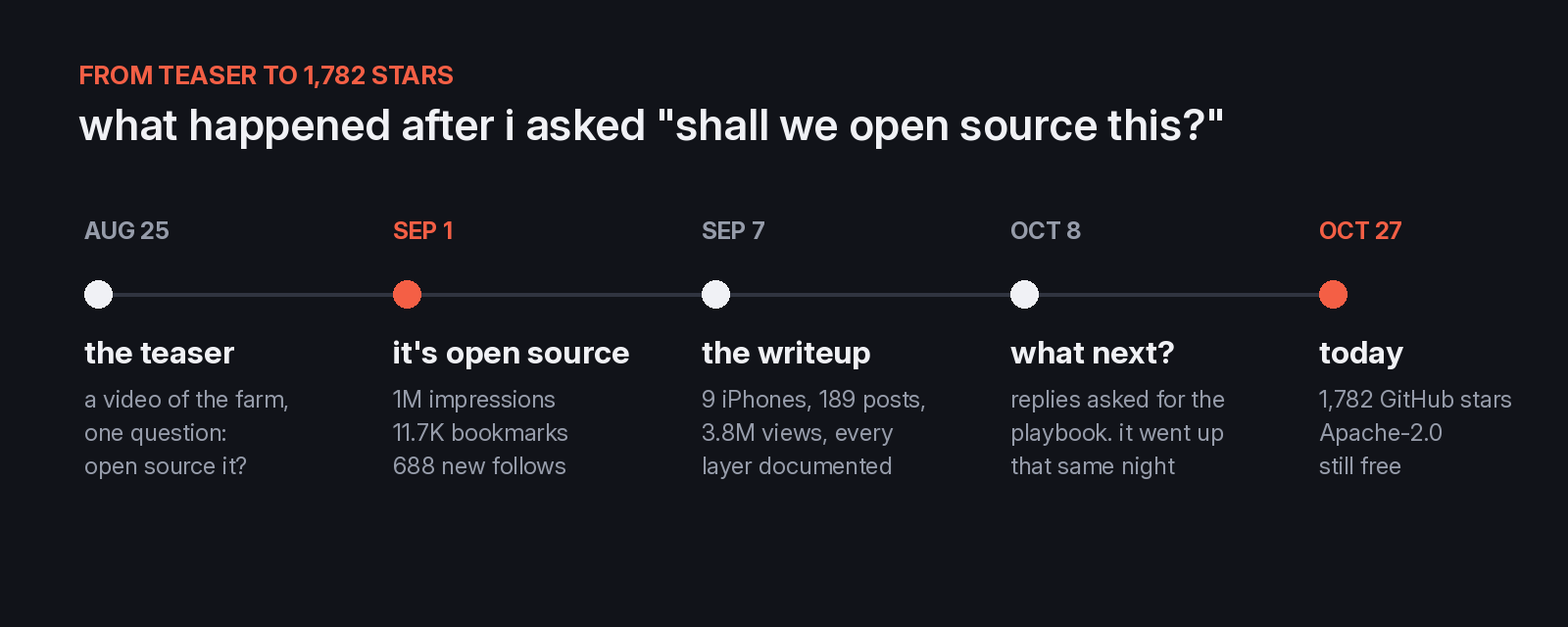
On August 25 I posted a short video of three iPhones scrolling TikTok on their own, wired into a hub on my desk. I had been learning from how the Chinese phone farms run and building my own, better version. The caption asked one thing. Shall we open source this?
The replies said yes, so on September 1 I put the whole application on GitHub. That post did 1,035,414 impressions, 11,685 bookmarks and 688 new follows. The repo is at 1,782 stars today. It is still free, still Apache-2.0, and nothing in it phones home.
This is the long version of that tweet. What the farm is, why it runs on real phones, what 21 days of it produced, the parts that took the longest to get right, and the seven steps to run your own.
#What iOS Farm is
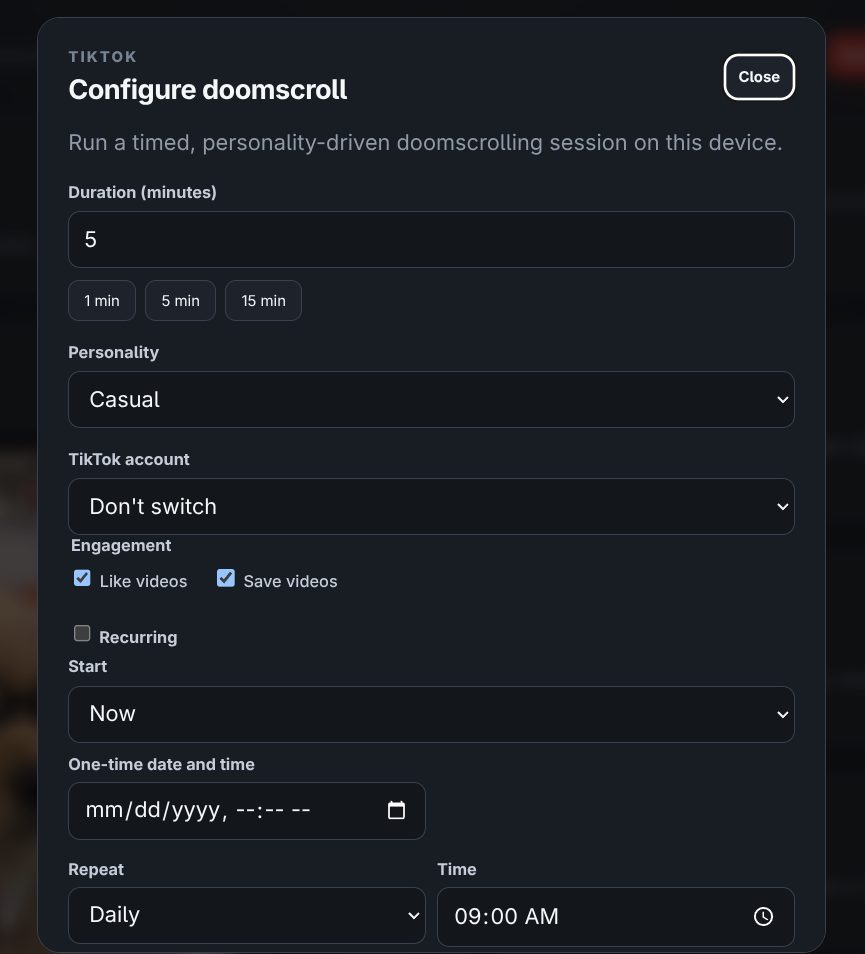
iOS Farm runs a fleet of physical iPhones from one Mac. You register a phone, and from then on you can watch its screen live in your browser, tap and swipe on it with your mouse, and schedule TikTok work on it. That means timed scroll sessions to warm an account, and posts or slideshows that go out now, once, daily or weekly.
Every job lives in Postgres with its full log, so a crash, a reboot or a redeploy never loses the queue.
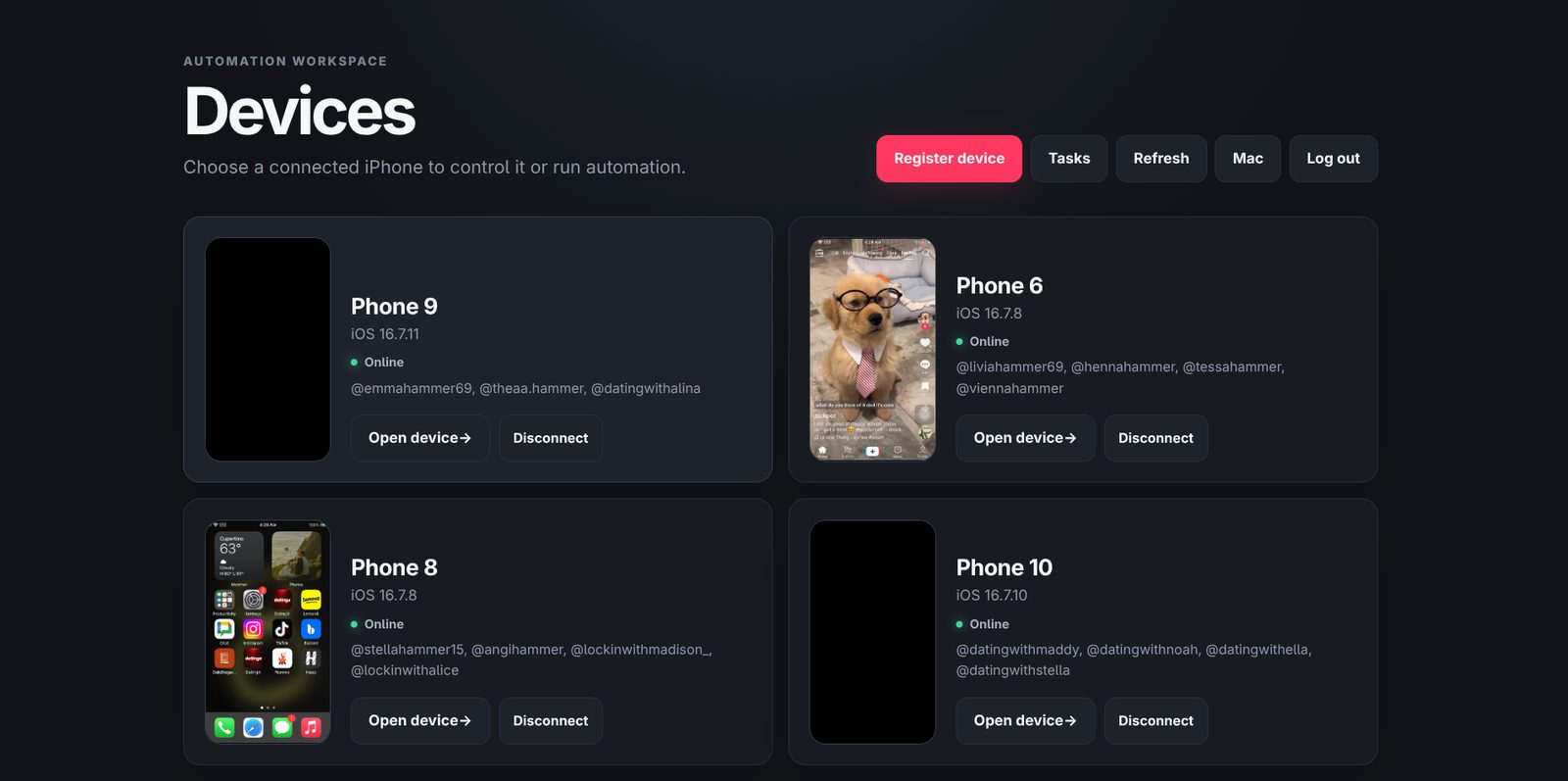
It needs no jailbreak and sends no forged requests. The phones run stock iOS and the TikTok app straight from the App Store. The farm drives them the same way Apple drives an app in its own UI tests.
#Why real phones instead of faking one
There are two ways to make TikTok believe a phone is watching.
The first is to become the phone. You reverse the Android app, register fake device IDs, rebuild the request signing, match the TLS fingerprint and rotate proxies. It scales to billions of rows, and a writeup doing exactly that went round the week I published. It was real work, and it sells the code for $699. The catch is that every constant you copy out of the app has a shelf life, and when you get one wrong TikTok answers with an empty 200 and no reason.
The second is to use a phone. A real iPhone, a real account, the production app. TikTok's own code signs its own requests on hardware it expects, so there is nothing to reverse and nothing that rots when the app updates.
| Faking the API | A real iPhone | |
|---|---|---|
| Reading profiles and videos | Hundreds per second | One feed at a time |
| Posting, liking, following | Mostly out of reach | Everything the app can do |
| What TikTok can catch | Device ID, signature, TLS, IP | Behaviour and account history |
| When TikTok updates | Re-derive the constants | Re-measure a few tap targets |
| When it fails | An empty 200 | A screenshot of what went wrong |
| Cost per unit | Proxy bandwidth | A used iPhone 8 and a USB port |
If you want data, emulate. If you want accounts that post and grow, run phones. We run phones, because at Handler we find the TikToks winning in an app's niche, and finding them is only half the job. The other half is warming accounts, scrolling like a person and posting on a schedule. That is what a farm is for.
#The 21 day test
Before I wrote anything up, the farm ran on its own for three weeks. Nine iPhone 8 class phones on one Mac mini and one powered hub. One post per phone per day, a scroll session most days, and nobody touched them after registration.
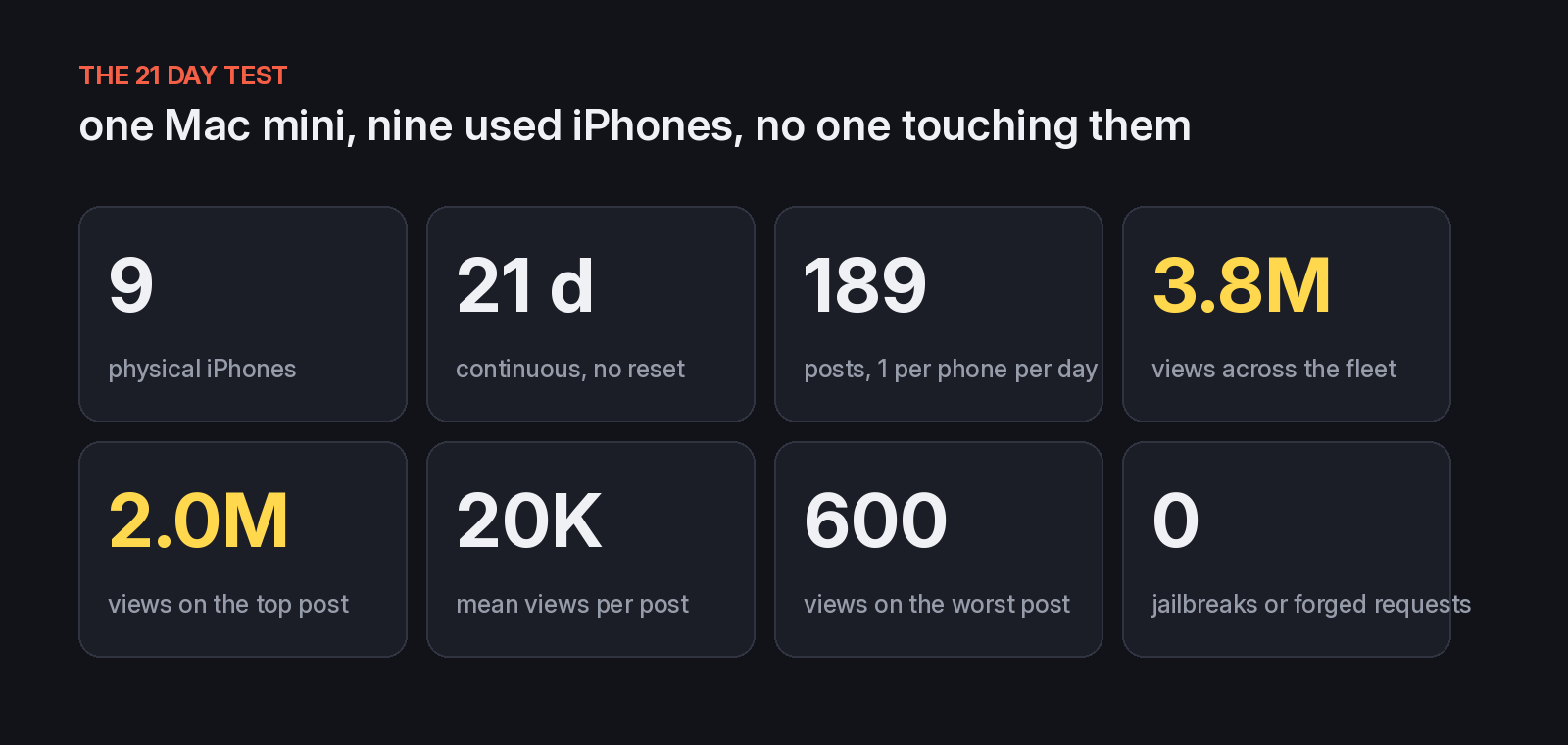
The average hides the real shape. One post did 2.0M of the 3.78M views, and the worst did 600. That is what a feed that rewards outliers looks like, and it is why the farm doesn't pick what to post. It just makes sure the post goes out, on time, once. Which video deserves a slot is a different problem, and I wrote 32 chapters on it in the TikTok farming playbook.
#What you get when you open a phone
Click into a device and you get its screen streaming live. Click to tap, drag to swipe, with home, lock and volume on the side. Next to it sits one-click TikTok automation and a log of everything the phone is doing.
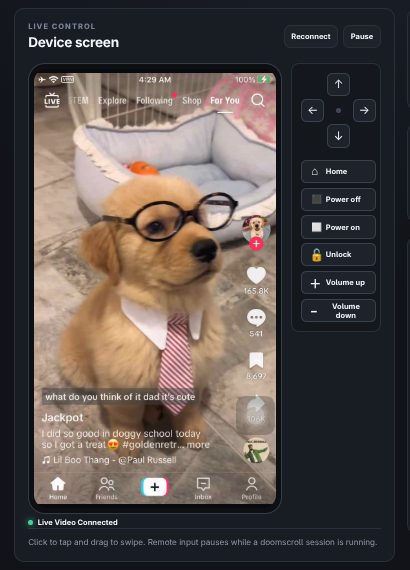
Scroll sessions get a personality and a duration, so ten phones don't all behave like the same bored robot at the same minute.
#The parts that took the longest
None of this is in a tutorial anywhere, which is most of why I wanted to publish it.
TikTok never sits still. Apple's test framework waits for an app to go quiet before it taps. TikTok's feed is a video that never stops with an overlay that keeps updating, so it never goes quiet. The first scroll loop would swipe once and hang until it timed out. The fix was to turn the wait off completely and tap by coordinates on the feed, never by looking up elements.
The like and save buttons move. They shift with caption length, with whether a sound row shows, and between TikTok releases. A fixed coordinate was right most days and silently wrong the rest. So before it taps, the farm takes a screenshot, draws the heart and bookmark icons at the phone's scale, and finds them in the image by matching shapes. It reads screen state the same way, with OCR, to know which account is logged in.
Stock WebDriverAgent couldn't do two things we needed. It had no way to put a video into the camera roll, which TikTok's composer reads from, and it couldn't press the home button before a test session existed, which you need to unlock a phone. Both are small source patches now, and both ship in the repo.
Phones die in boring ways. They lock. iOS reclaims memory. A bus-powered USB hub browns out under load and drops every phone on it at once. So one service owns every phone's agent, watches its health, and restarts it on each of those failures. A locked phone gets its own status, because it is the most common reason a job stalls and the fix is different from every other one.
Code signing needs you to be physically there. Building the agent reads your login keychain, and that only unlocks in a real desktop session. Run the build over SSH and it fails with no useful error. Everyone who sets this up hits that once.
Posting twice is worse than not posting. A job that publishes is built to run at most once. If a phone dies halfway through a post, a retry can't put the same video out twice.
#How it fits together
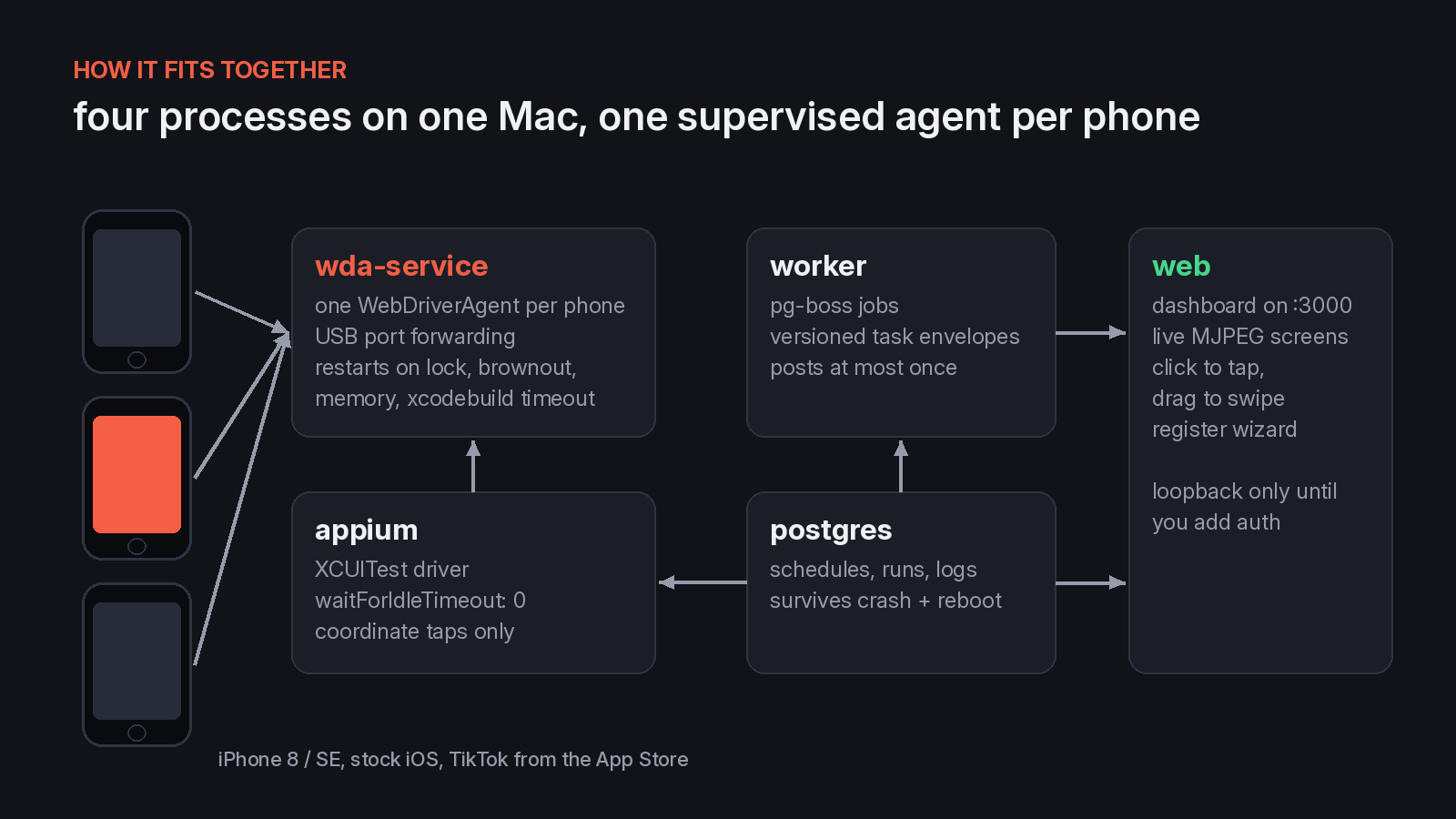
The dashboard only listens on your own machine by default, and it refuses to start on any other address until you plug in an authentication provider. A farm can't end up on the open internet by accident. If you want to reach it from your phone, put a tunnel with access control in front of it.
Tasks are stored with a plugin name and a version, so a schedule written for an old version can never silently run a new one. TikTok is the built-in plugin. You can write your own for any other app without touching the core.
#Run your own in seven steps
You need a Mac with the full Xcode app, Node 22 or newer, Postgres (the repo ships one in Docker), an iPhone on iOS 16 to 18 with Developer Mode on, and an Apple developer team. A free personal team covers one phone.
git clone https://github.com/Git-Agni/prod-FARM-IOS-Core.git phone-farm
cd phone-farm
npm install
npm run appium:install-driver
cp .env.example .env        # your iOS version, team ID, bundle ID, database URL
npm run db:up && npm run db:migrate
npm run wda:prepare         # from Terminal.app, not SSH
Then start the four processes, one terminal each:
npm run appium
npm run wda:service
npm run worker
npm run web
Open http://127.0.0.1:3000, click Register device, and the wizard checks every link in the chain before it saves the phone. Xcode, the device, signing, the disk image, the agent, video, touch, and TikTok. Most of the support questions we got before the wizard existed were one of those eight failing silently.
For a farm that runs all night, give every phone its own port on a powered hub, turn off sleep on the Mac, and raise the open file limit. The setup guide has the exact commands, and the technical writeup goes layer by layer from Xcode signing to the scheduler.
#Cheap phones are the point
The coordinates ship for a 375 by 667 point screen. That is the iPhone 8, and it also fits the iPhone SE 2 and 3 and the iPhone 7. Those are some of the cheapest iPhones you can buy used, which makes them the cheapest farm you can build. If a tap lands in the wrong place on one phone, you fix it by clicking the right spot on that phone's live screen in the dashboard.
#Why give it away
The farm is plumbing. It makes sure the right video goes out on the right phone at the right time. It doesn't know what the right video is. The hard part of TikTok was never the posting, it was knowing what to post, and that is the part I spend my days on. Keeping the plumbing closed would have helped nobody.
Giving it away paid back fast. The repo has 320 forks, and people I have never met have sent pull requests and filed issues like a WebDriverAgent port dropping on an iPhone XS, a phone I never tested on.
So it stays free. If you build a farm on it, tell me. I want to see it.
#FAQ
What is an iPhone farm? A group of real iPhones run from one computer to warm up and post on social accounts like TikTok. iOS Farm runs them from a Mac and puts every phone's screen in your browser.
Is iOS Farm free? Yes. The code is on GitHub under Apache-2.0 and nothing in it phones home.
Does it need a jailbreak? No. The phones run stock iOS and TikTok from the App Store. The farm drives them through Apple's own UI test framework.
Which iPhones work best? The tap coordinates ship for the iPhone 8 screen, which also fits the iPhone SE 2 and 3 and the iPhone 7. The phone needs iOS 16 to 18 with Developer Mode on.
What do I need to run it? A Mac with Xcode, Node 22 or newer, Postgres and an Apple developer team. A free personal team covers one phone.
#Links
- Code: github.com/Git-Agni/prod-FARM-IOS-Core, Apache-2.0
- Setup guide: gethandler.ai/ios-farm
- Technical writeup: gethandler.ai/tiktok-iphone-farm
- What to post once it runs: the TikTok farming playbook, all 32 chapters, free
- The launch post on X: x.com/consumerxai