An App Store rejection is Apple's App Review team refusing a build, with a guideline number and a message in App Store Connect. In late 2026 the one founders hit most is Guideline 4.3 (Spam), often paired with 4.2.6 (App Generation Services), and it now comes with nine written questions instead of a flat no. Answer all nine in full and you can get approved without changing a line of code. Rasty Turek did exactly that on November 16, 2026.
I collected every primary source I could find from the last few weeks: a full rejection letter, the full reply that got it approved, the posts from Phillip Shoemaker (who ran App Review from 2009 to 2016 and wrote the guidelines), the account terminations, and my own two approvals on November 16, one in 30 minutes and one in 1 minute. Everything is quoted and linked back to the person who posted it.
#Why so many apps are getting rejected right now
Three things changed in 2026, and they stack.
- More apps. The Information reported an 84% surge in new App Store submissions this year, as cited by Phillip Shoemaker. Vibe coding made shipping an app a weekend job.
- Stricter rules. In June Apple rewrote Guideline 4.3 so developers who repeatedly submit low-effort apps can be removed from the Developer Program. On October 16 Apple updated the guidelines again: new features must be described specifically in the Notes for Review, and a new Guideline 2.5.19 bans bait-and-switch apps by name.
- Less trust in new accounts. Since September, new developer accounts get a Guideline 2.1 notice that opens with "This app has been submitted by a developer account that has a limited App Review history."
Apple's own numbers, from its October 16 developer post as quoted by Shoemaker: it kept more than 150,000 apps with safety issues off the store last year and terminated more than 193,000 developer accounts for fraud and abuse.
Erik Goins put the mood in one line that did 69K views:
"Apple isn't rejecting your app. They're rejecting the entire category of 'I vibe coded a clone over the weekend.'" Erik Goins on X
Part of that is true. The rest of this post is about the developers who did build something real and still got the letter.
#Case 1: Rasty Turek, PlainPic, rejected under 4.3 and 4.2.6, then approved
Rasty Turek (@synopsi) builds small iOS apps under his company Wraxle LLC, including Photo Vault - Vaultaire and Place in Time. His new app, PlainPic, shows what hidden data a photo carries (GPS, device details, the C2PA and IPTC fields that make Instagram add an "AI info" label) and removes only what you pick, on device.
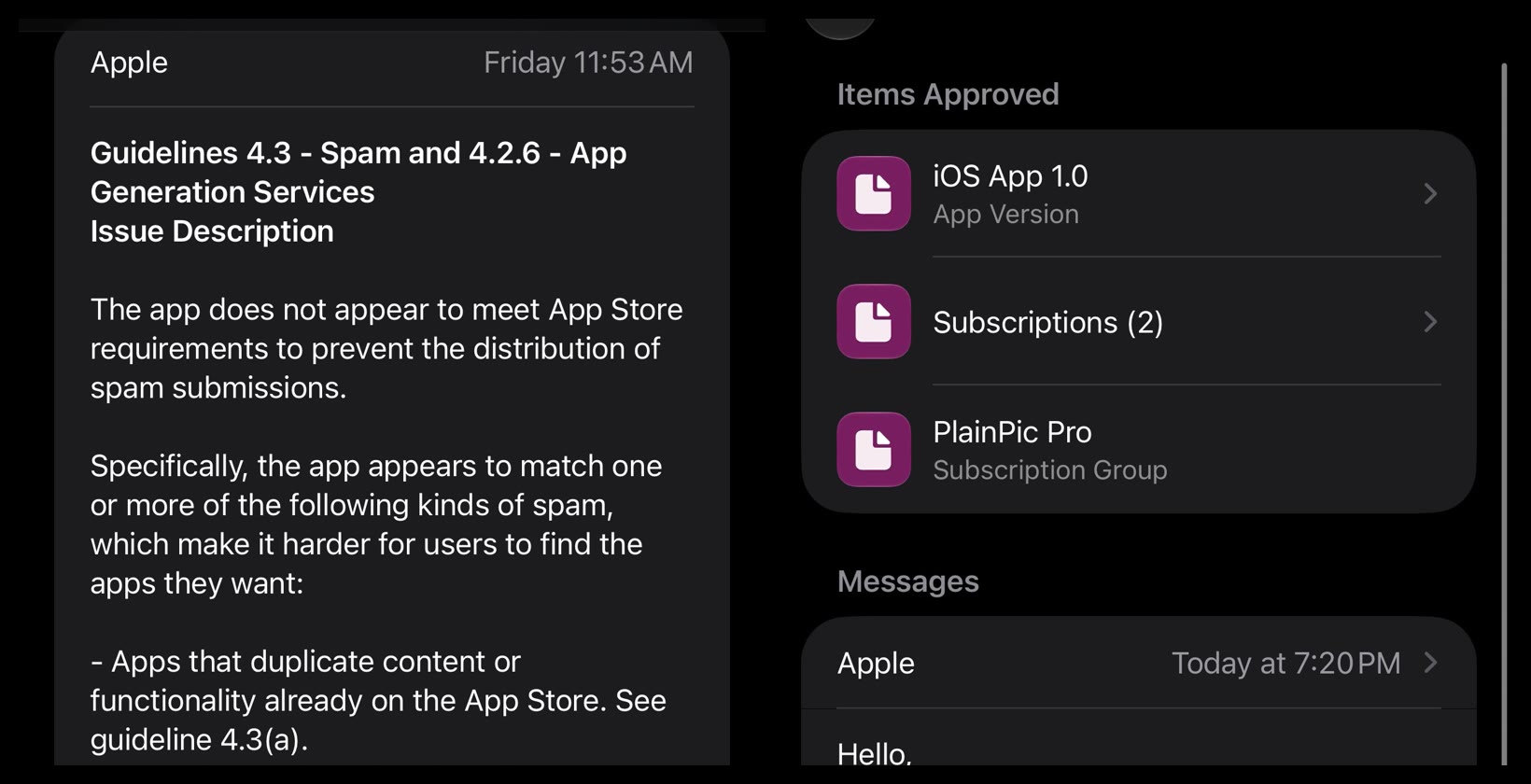
On a Friday he got this:
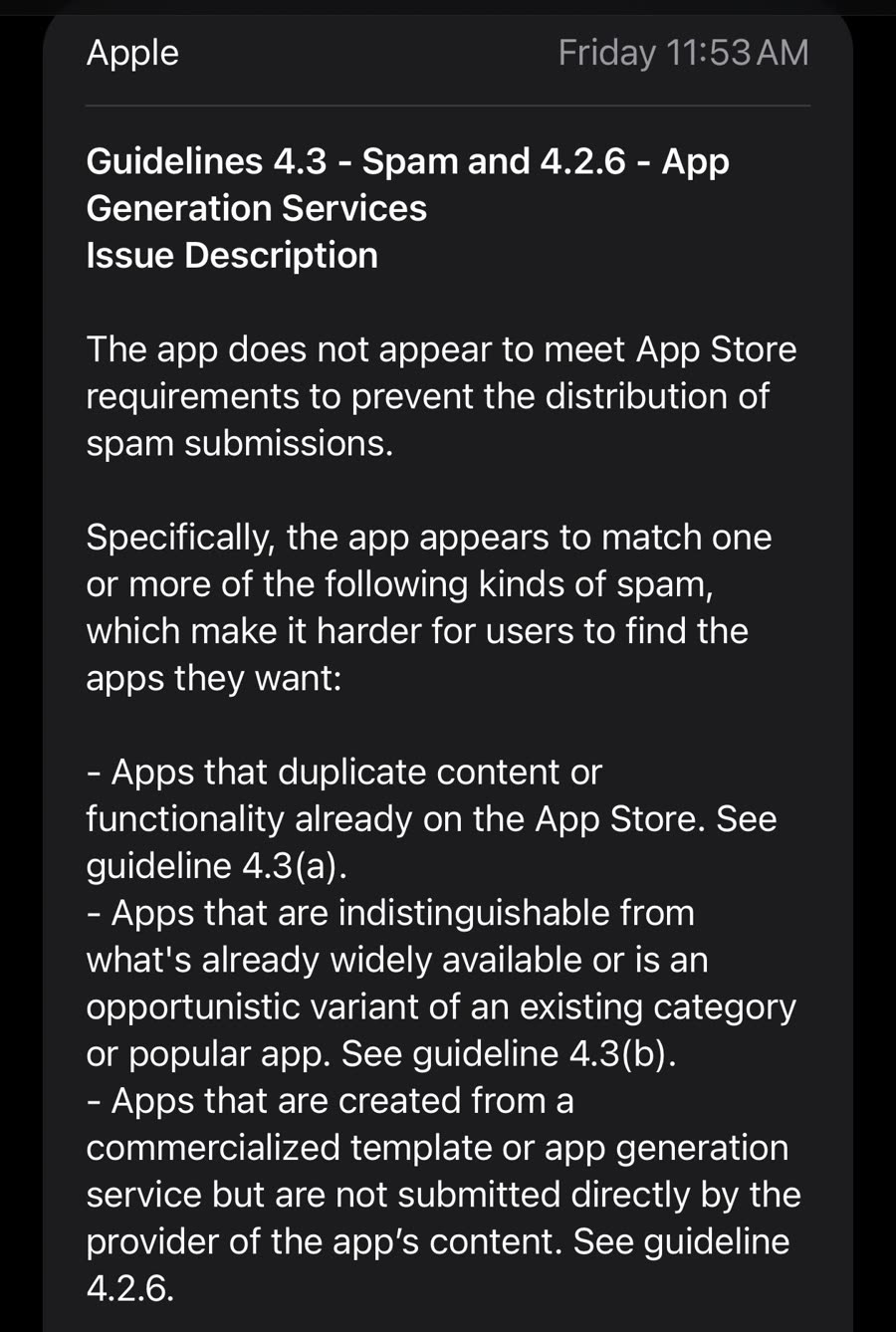
The letter lists three kinds of spam the app "appears to match":
- 4.3(a) Apps that duplicate content or functionality already on the App Store.
- 4.3(b) Apps that are indistinguishable from what's already widely available, or an opportunistic variant of an existing category or popular app.
- 4.2.6 Apps created from a commercialized template or app generation service but not submitted directly by the provider of the app's content.
Then the part most developers miss. Apple says if any of that applies, don't resubmit until you've made significant changes. But if you believe the app already meets 4.3(a), 4.3(b) and 4.2.6, do not resubmit at all. Reply to the message and answer all of these in full:
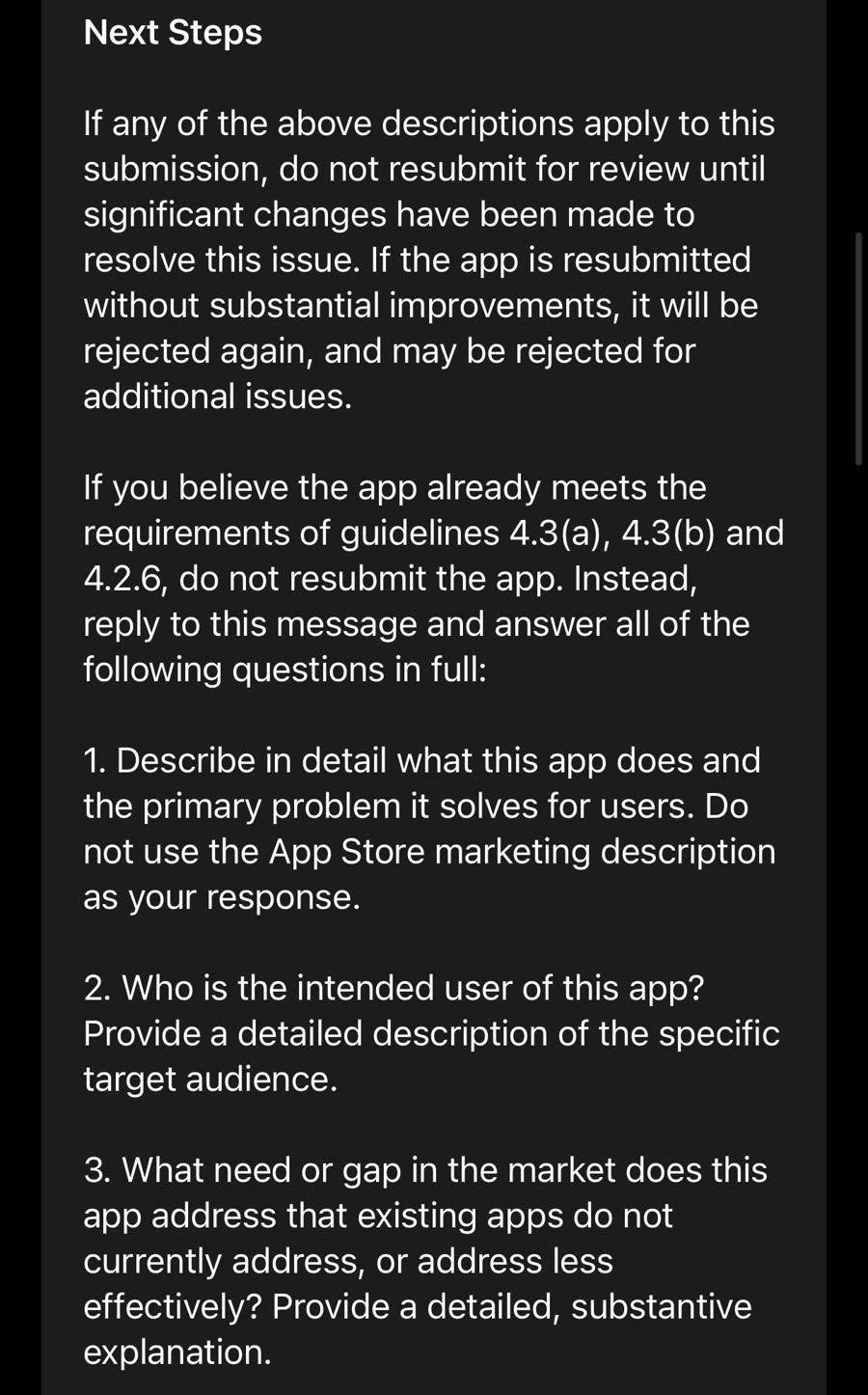
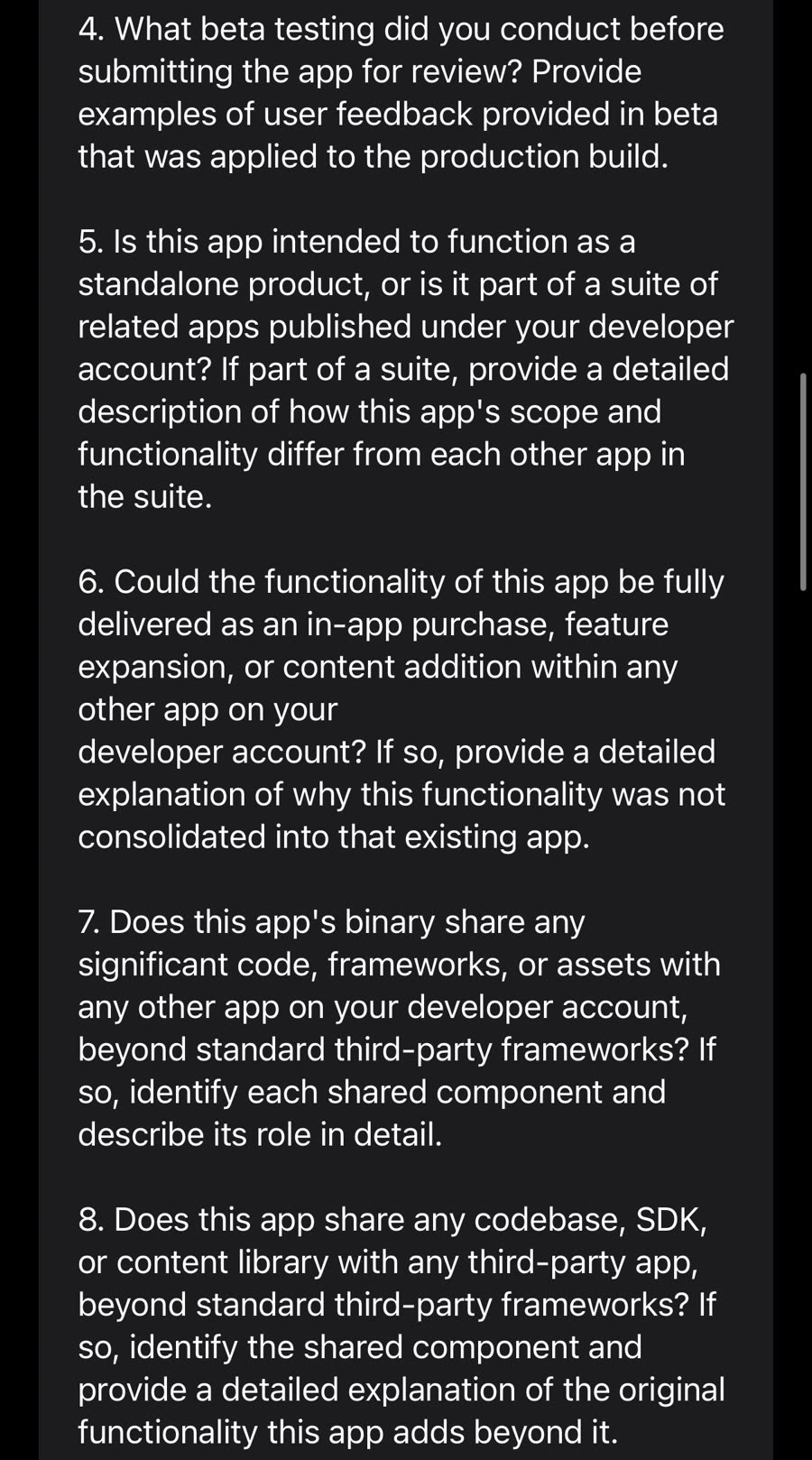
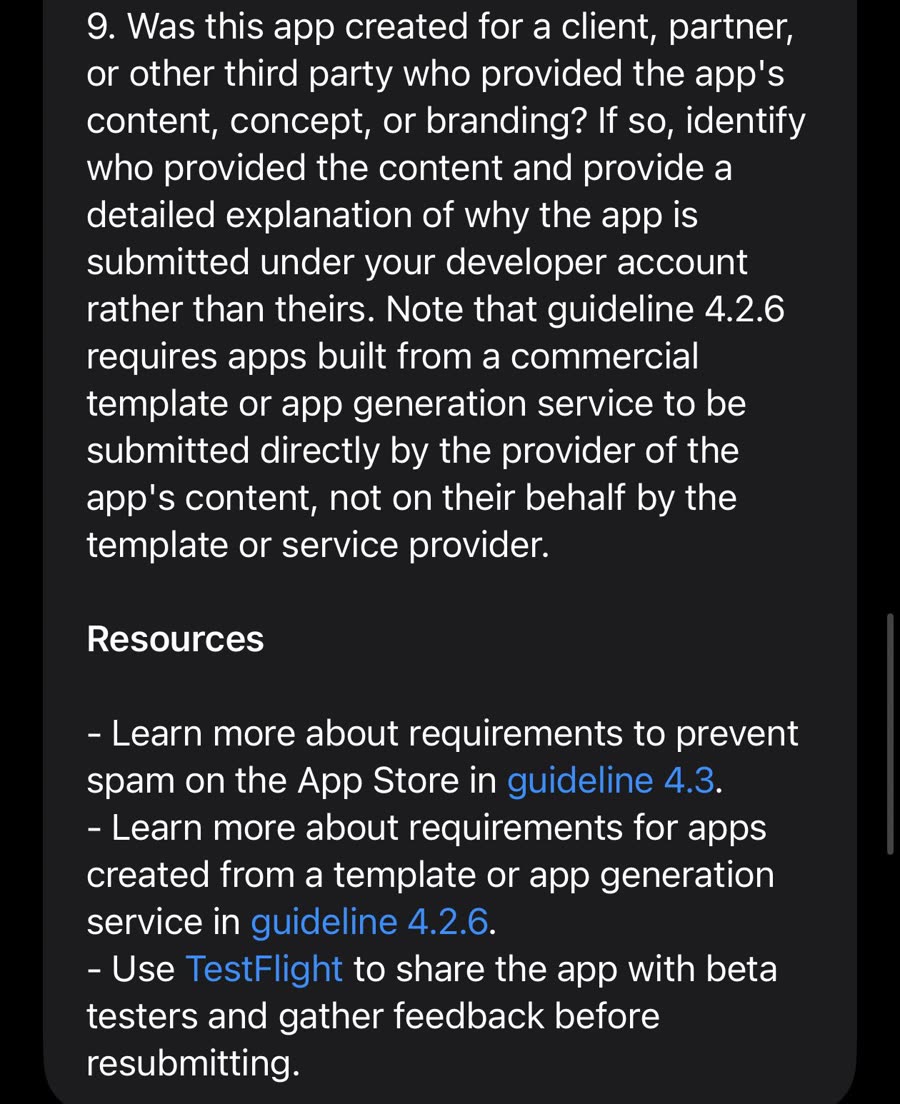
Apple's next steps and the 9 questions. Screenshots by Rasty Turek (@synopsi). Click any to read it full size.
#The 9 questions Apple asks after a 4.3 rejection
- Describe in detail what this app does and the primary problem it solves for users. Do not use the App Store marketing description as your response.
- Who is the intended user of this app? Provide a detailed description of the specific target audience.
- What need or gap in the market does this app address that existing apps do not currently address, or address less effectively?
- What beta testing did you conduct before submitting the app for review? Provide examples of user feedback provided in beta that was applied to the production build.
- Is this app intended to function as a standalone product, or is it part of a suite of related apps published under your developer account? If part of a suite, describe how this app's scope and functionality differ from each other app in the suite.
- Could the functionality of this app be fully delivered as an in-app purchase, feature expansion, or content addition within any other app on your developer account? If so, explain why it was not consolidated into that existing app.
- Does this app's binary share any significant code, frameworks, or assets with any other app on your developer account, beyond standard third-party frameworks? If so, identify each shared component and describe its role.
- Does this app share any codebase, SDK, or content library with any third-party app, beyond standard third-party frameworks? If so, identify the shared component and explain the original functionality this app adds beyond it.
- Was this app created for a client, partner, or other third party who provided the app's content, concept, or branding? If so, identify who provided the content and explain why the app is submitted under your developer account rather than theirs.
Read them as a reviewer would. Questions 1 to 4 test whether a real product exists. Questions 5 to 8 test whether you're running an app farm on one account. Question 9 tests whether you're an agency or template shop publishing for someone else, which is exactly what 4.2.6 forbids.
#The reply that got PlainPic approved
Rasty posted his full reply because, in his words, "Soooo many people asked me what did I do." (post, 173 bookmarks in a day.)
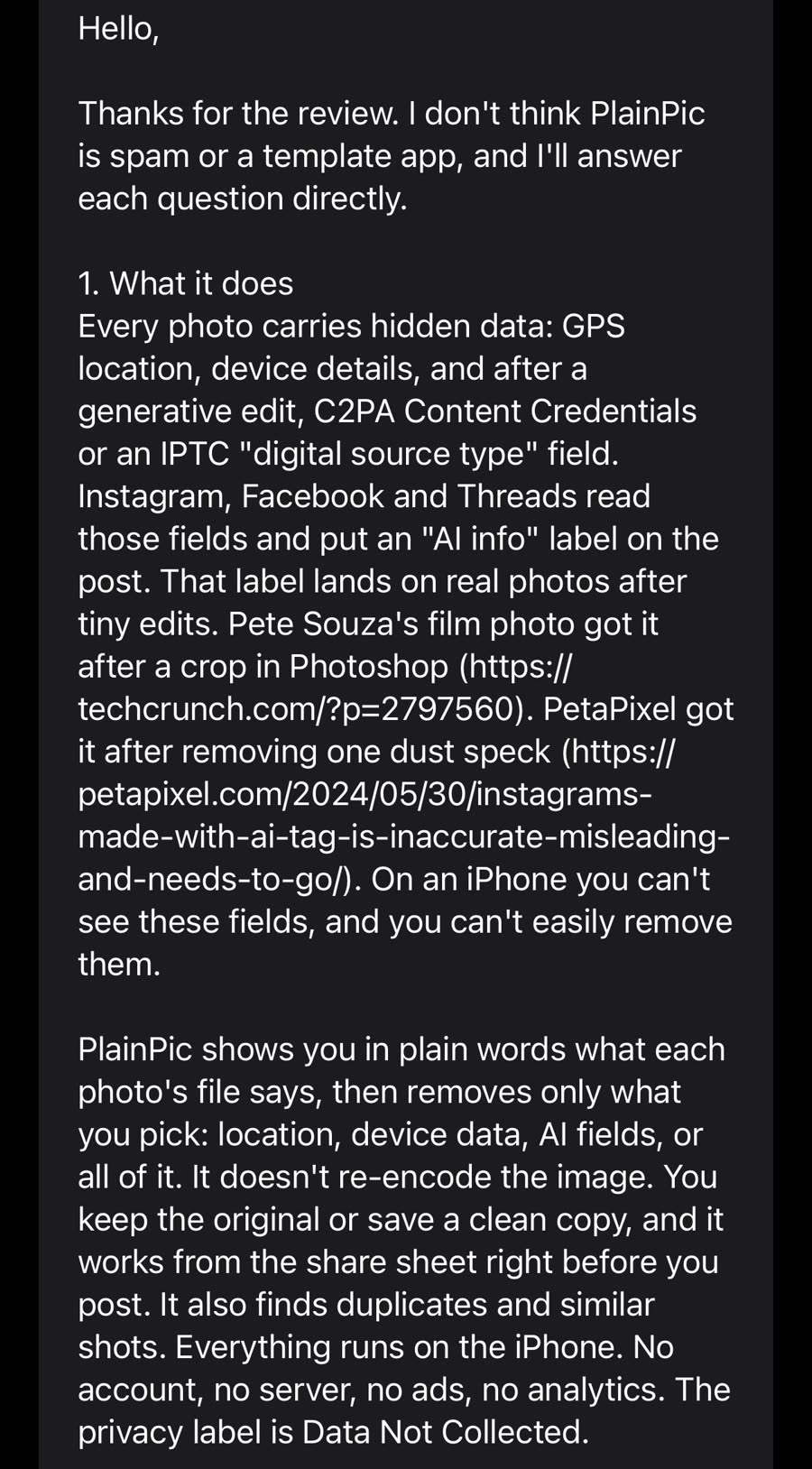
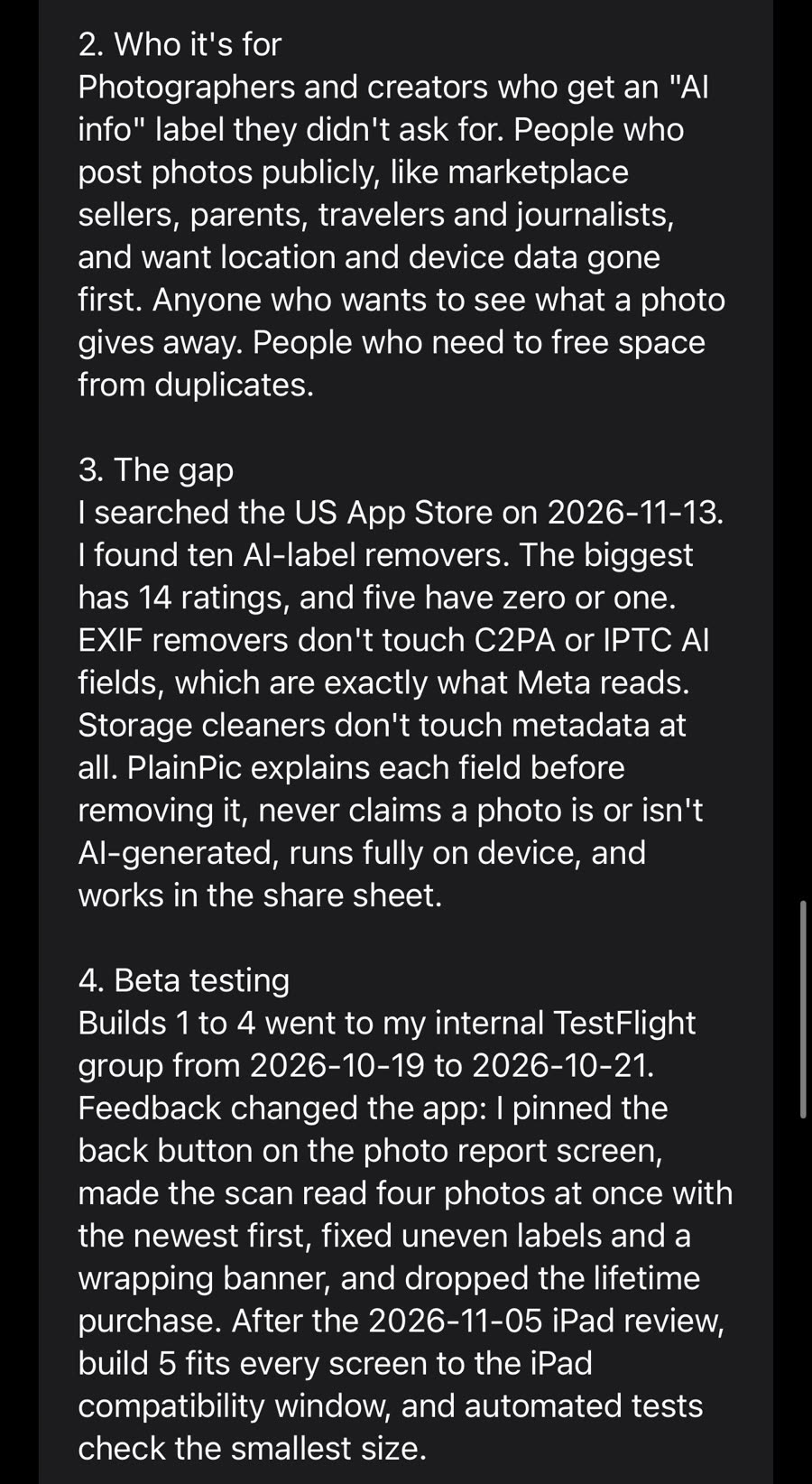
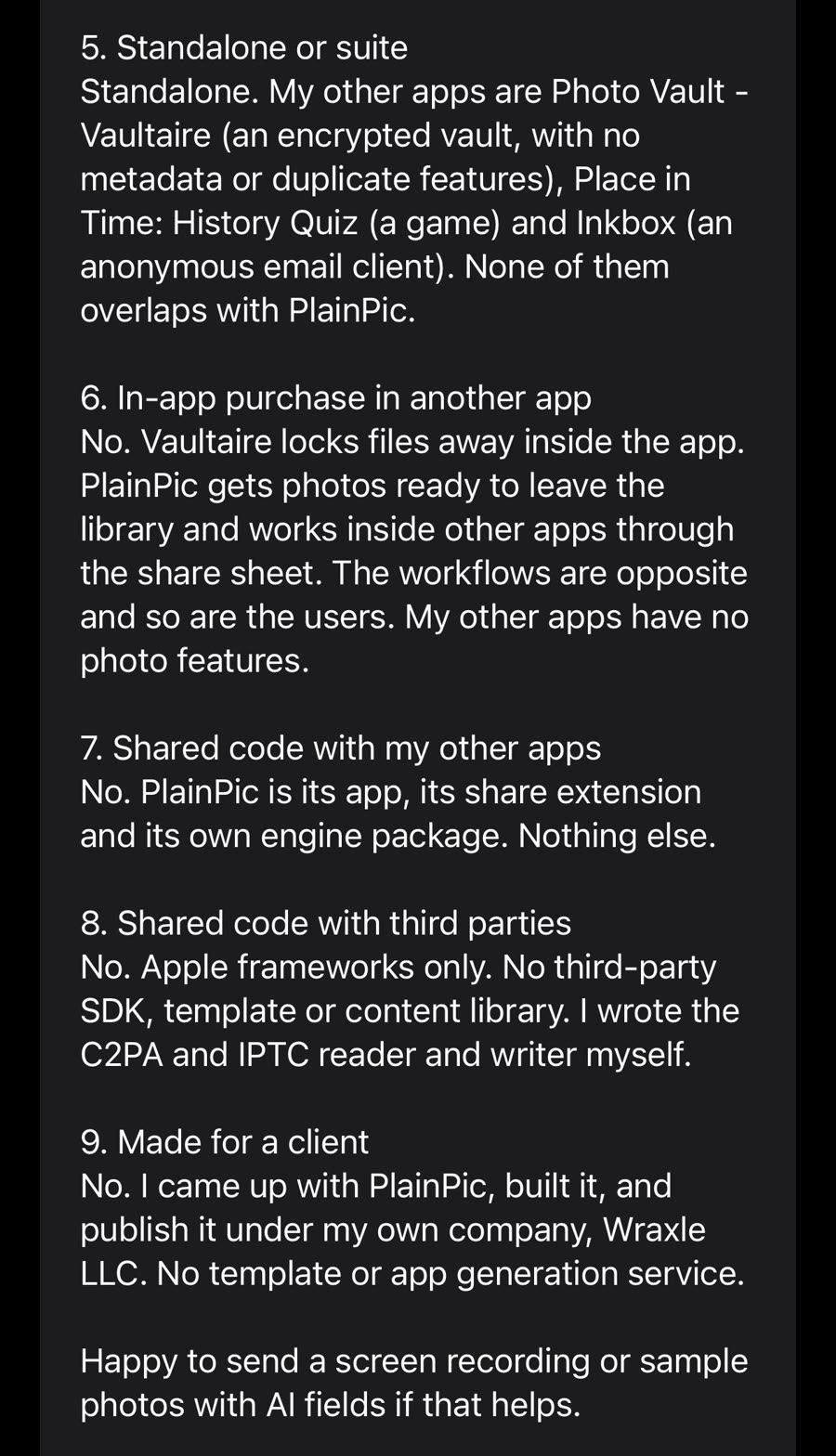
Rasty's full reply, answers 1 to 9. Screenshots by Rasty Turek (@synopsi). Click any to read it full size.
What makes it work, answer by answer:
- 1. What it does. Not the store copy. A plain explanation of the user problem with two press links as proof (TechCrunch and PetaPixel stories about real photos getting "AI info" labels), then exactly what the app does and doesn't do, ending with "The privacy label is Data Not Collected."
- 2. Who it's for. Named groups: photographers, marketplace sellers, parents, travelers, journalists.
- 3. The gap. Receipts with a date. He searched the US App Store on 2026-11-13, found ten AI-label removers, the biggest with 14 ratings, five with zero or one. Then why existing EXIF removers miss the fields Meta reads.
- 4. Beta testing. Build numbers and dates (builds 1 to 4 on internal TestFlight, Oct 19 to 21), plus five specific changes that came from feedback.
- 5 to 8. Suite and shared code. Names every other app on the account, says what each does, and states "Apple frameworks only. No third-party SDK, template or content library. I wrote the C2PA and IPTC reader and writer myself."
- 9. Client work. "No. I came up with PlainPic, built it, and publish it under my own company, Wraxle LLC."
- Close. Offers a screen recording or sample photos.
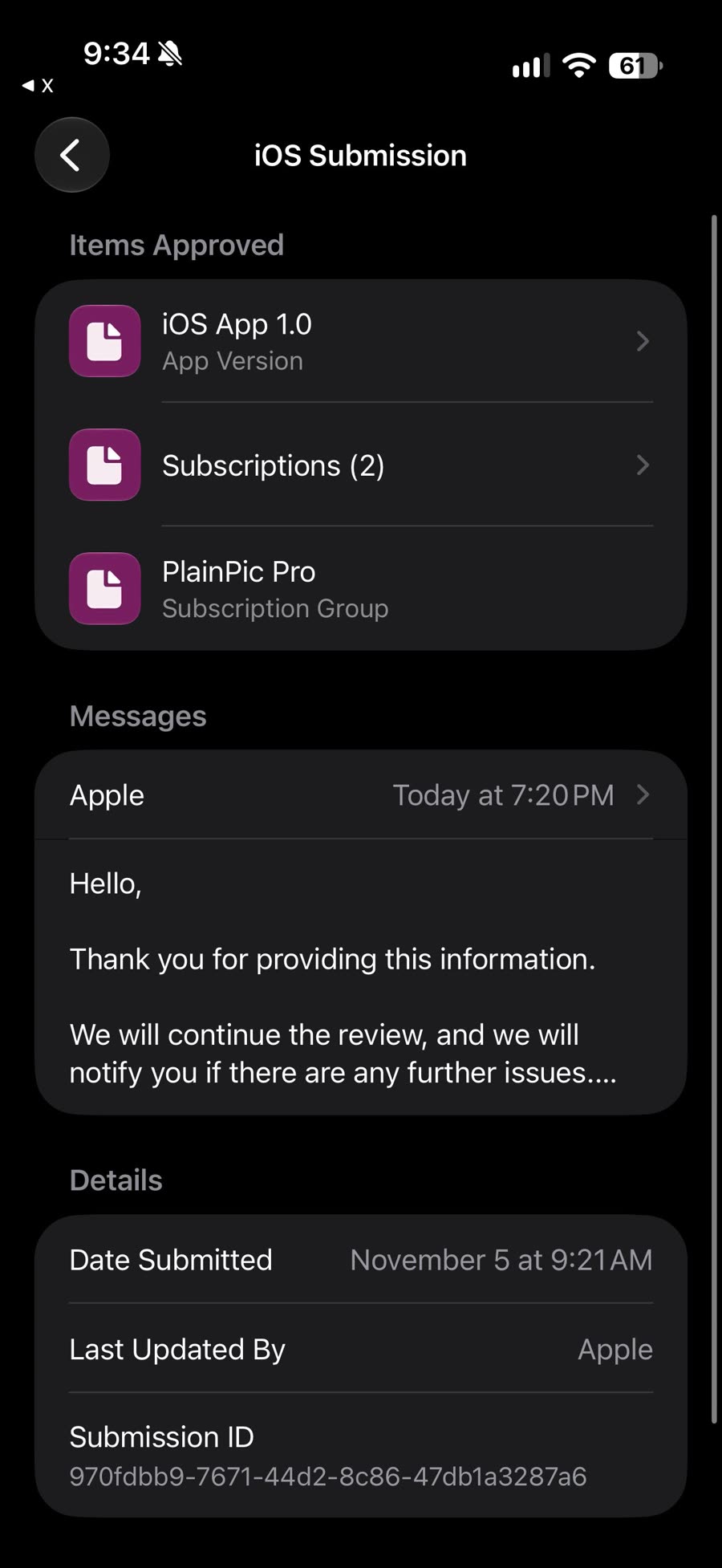
Apple replied "Thank you for providing this information. We will continue the review," and approved the app with its two subscriptions:
His own read is worth keeping in mind: "I genuinely think this is their automated way to discourage developers from submitting new apps and they only consider ones that actually get an answer." And in the replies he admitted the app was thin on purpose: "I've done very little with the app. Only this one feature and wanted to see if it gets through. Now I actually have to polish the app." (reply)
It doesn't always work. Under the same post, a developer building apps for restaurants wrote that he "answered every question but get the same again" (@_darrenjeffrey). If your app really is a near copy of your other apps or a template, the questions will surface it.
#Case 2: my two approvals, 30 minutes and 1 minute
On November 16 I shipped two updates. Flamme (Cozy Couples, under Flamme Inc.) went from submitted to approved in 30 minutes. Backed (Posture, under Agniverse OU) took 1 minute.
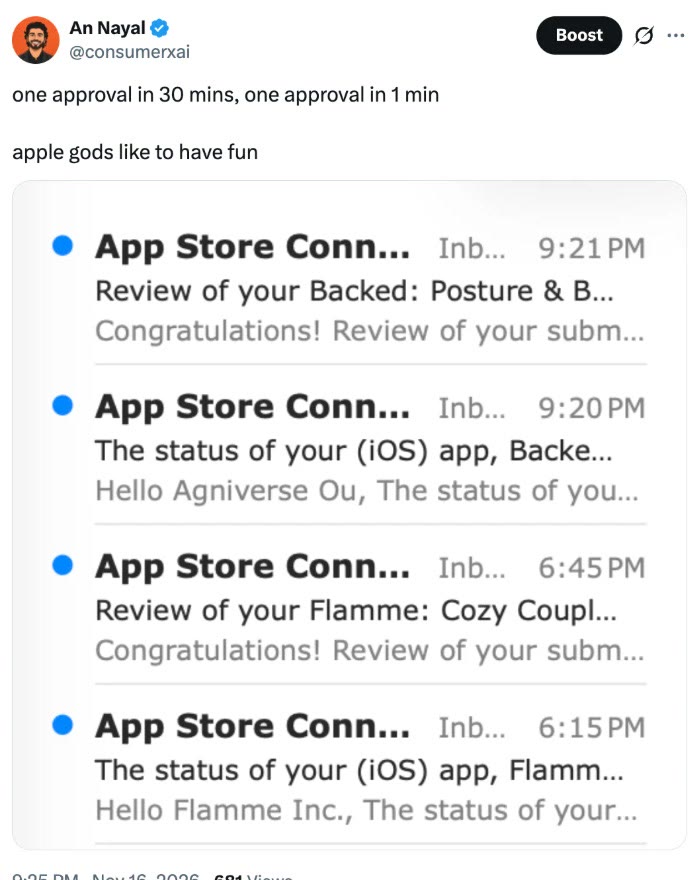
Both were updates, not new apps. Shoemaker says an update gets about 6 minutes of a reviewer's time against about 13 for a new app, so updates were always going to be quicker. I went back into App Store Connect to check what I actually sent, and the two were not the same:
- Backed (1 minute) had full Notes for Review and a demo account with an active subscription. This is the exact text:
How to review Backed:
- Tap "I already have an account" and sign in with the demo account above. It has an active Pro subscription, so it goes straight to the full plan.
- On Home, tap Start Workout to run a guided session (exercise, countdown, completion).
- Progress shows workout history; Settings has reminders and profile.
New accounts see a subscription paywall at the end of onboarding. This is intentional: the personalised plan is the paid product.
Backed is a general wellness and fitness app (posture and stretching routines). It is not a medical device and does not diagnose or treat any condition.
Look at what it does in 615 characters. It gets the reviewer past the login and the paywall in one step, tells them the paywall is on purpose so it doesn't read as a bug, and answers the health question before they ask it.
- Flamme (30 minutes) went through with an empty Notes field. Flamme has been on the App Store for years with a long clean review history, and Shoemaker says reviewers spend less time on updates to apps with a clean history. A brand new app on a new account doesn't get that benefit, so don't copy this one.
What both apps do have is their own website. Flamme and Backed each live on their own domain, with a privacy policy, terms and a support page, all linked in App Store Connect and inside the app. Different apps, different companies, different sites, and nothing in common that a reviewer could call 4.3(a) or 4.3(b).
Same week, same Apple. That's the point of this whole post. Phillip Shoemaker says App Review gets roughly 15% of its calls wrong, "So, that's kind of a lottery!" (post). You can't control the reviewer you get. You can control how much of the reviewer's job you've already done for them.
#What the man who ran App Review says
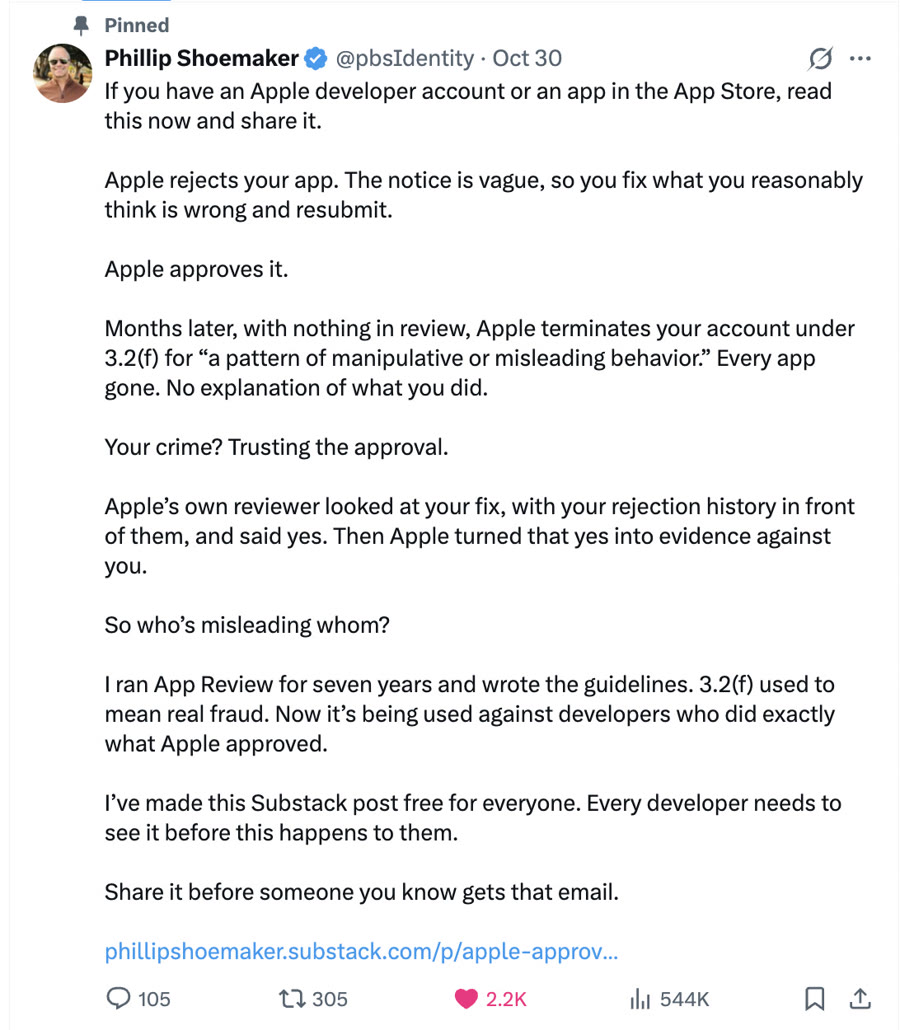
Phillip Shoemaker (@pbsIdentity) ran App Review at Apple from 2009 to 2016, built the team and wrote the guidelines with Steve Jobs. He now writes about it on his Substack. His pinned post from October 30 did 544K views and 3,711 bookmarks:
The things he's shared that every founder should know:
- Review time. About 13 minutes for a new app and 6 for an update when he ran the team, on an iPhone and an iPad, on the latest OS. (post)
- Who reviews you. About 80% of his reviewers were former Apple retail staff, many from the Genius Bar. Teams are split by your app's primary language. New reviewers go looking for reasons to reject, experienced ones let minor issues pass. (Substack)
- Your history follows you. Reviewers see every previous rejection, the earlier reviewer's notes and screenshots, and every account linked to yours. Once a reviewer finds something, the next one looks for it again.
- The 4.3 line. "We trained reviewers to flag developers at 9 similar apps. At 10, the door closed." The threshold was never written into the guideline. (post)
- Vague on purpose. He and Steve Jobs meant to start the guidelines gray and make rejections specific over time. "But look where we are. Gray and vague." (post)
- Keep everything. Asked what to save as proof, his answer: "Keep everything especially the rejection reasons, screenshots… everything." (post)
#Apple developer account terminated under 3.2(f)
This is the one that scares people. Shoemaker's pattern, with details changed: an AI photo app gets rejected for objectionable content, the developer removes what they think is the problem, App Review approves the fix, and months later Apple terminates the whole account under Section 3.2(f) of the Developer Program License Agreement for "a pattern of manipulative or misleading behavior." Every app comes down. The notice names no app, build or date.
He says 3.2(f) used to come only from Apple's Fraud team, for real fraud. Since mid-2026 he's seen App Review issue them for rejection history (too many submissions, too many app name changes, too many 1.1 rejections), and 3.2(f) inquiries to his practice are up about 1,000% in four months. (Substack)
Not everyone agrees there's a wave. Ariel Michaeli, CEO of Appfigures, said the data suggests there isn't one (post). Both can be true: the total may be flat while the reasons shift toward submission behavior.
#Guideline 2.1: the new-account gate
If your account is new, your first rejection may say nothing about your app. It's filed under Guideline 2.1 Information Needed and asks for six things before a reviewer opens the build (Shoemaker's breakdown):
- A screen recording on a physical device running the latest OS, from launch, showing sign up, login, account deletion, user content reporting and blocking, and paid content.
- The app's purpose, target audience, the problem it solves and its value.
- Setup instructions, login credentials and sample files.
- Every external service the app relies on, including AI services and payment processors.
- Any regional differences in features or content, or a statement that there are none.
- Documentation for regulated industries or protected third-party material.
His advice: put the full packet in the Notes field on your very first submission, before Apple asks. Then leave the submission alone, and hold your other apps until the first one is approved, because several pending apps from a new account reads as volume.
#How to answer an App Store rejection (the playbook)
- Read which path Apple gave you. If the letter says reply instead of resubmit, reply. Resubmitting the same build adds a rejection to your history.
- Answer every question with a number in it. Dates, build numbers, competitor counts, rating counts, beta tester feedback. Rasty's gap answer works because it has a date and a count.
- Never paste your store description. Apple says so in question 1.
- Name every app on the account and say in one line why each is different. Don't let the reviewer find a sibling app on their own.
- List your SDKs and services honestly. Reviewers can see them.
- Offer proof: a screen recording, sample files, a demo account that stays alive.
- One status inquiry after two weeks is reasonable. More doesn't help.
- If it's really a 4.3 problem, change the product, not the wording. Merge it into your existing app as a feature, or make it different enough to answer question 6 honestly.
#How to appeal an App Store rejection
If you've answered and still disagree, you can appeal to the App Review Board through the Contact Us form in App Store Connect. Shoemaker's rule for anything Apple escalates: they want an apology (if something was wrong), an explanation of how it happened, and a plan to stop it happening again, in that order.
#How to fill the App Review notes field
The Notes field in App Store Connect (App Review Information) is where most of the reviewer's homework gets done. Apple's own rules for it:
- It holds up to 4,000 bytes, in any language.
- Guideline 2.3.1(a): "All new features, functionality, and product changes must be described with specificity in the Notes for Review section of App Store Connect (generic descriptions will be rejected)."
- Guideline 2.1(a): include demo account info and turn on your back end. The demo account in the sign-in fields must not expire. Extra accounts go in the notes.
- Guideline 2.1(b): if any in-app purchase can't be found or reviewed in the app, explain why in the notes.
- Apple's Before You Submit list: explain non-obvious features and in-app purchases in the notes, with supporting documentation where it helps.
The structure I use: what the app does, who it's for, how to test it step by step (demo login, how to reach every paid feature, where account deletion lives), what's new in this version and where to find it, every outside service including AI providers, the other apps on the account, and the app's own website with privacy, terms and support.
I turned that into a free Claude Code skill. Point it at your app's code and it writes the notes, the reply to Apple's 9 questions after a 4.3 rejection, or the Guideline 2.1 packet for a new account: github.com/Git-Agni/apple-app-review-skill.
#Free GitHub repos that catch rejections before you submit
Arthur Yuzbashev posted about one of these today, "Apple rejected my first app twice. There's a free GitHub repo that would've saved me both times" (post, 149 bookmarks in a few hours). These are the ones worth knowing:
- app-store-compliance by Mirza Iqbal (465 stars). A playbook plus a guard script you point at your Xcode or Android project before you submit. Its data file maps 123 rejection patterns across Apple and Google Play to the guideline and the fix, plus a six-section review notes template. Free for individuals and for companies under $20M a year in revenue (custom OpenRoots license, read it before you use it at work).
- app-store-preflight-skills by truongduy2611 (1,418 stars, MIT). An AI agent skill that scans iOS and macOS projects for rejection patterns. The review notes template in app-store-compliance comes from here.
- appstore-submission-checklist by lukylab (CC BY 4.0). Separate checklists for a new app and for an update.
- app-rejection-fixes by jaywcjlove (MIT) and app-store-rejections by andrewmcwattersandco. Real rejections with the fixes that worked.
What none of them cover yet is the 4.3 spam letter with its nine questions, the 3.2(f) termination, or the new-account 2.1 gate. Those are what apple-app-review-skill is for. Run a scanner first for the technical misses (demo account, privacy manifest, account deletion, staging backend), then write the notes and the answers.
#Pre-submit checklist to avoid an App Store rejection
- One website per app, with privacy policy, terms and support, linked in App Store Connect and inside the app.
- Support email on the app's own domain.
- Notes for Review written as if the reviewer knows nothing: what the app does, how to reach every paid or gated feature, every new feature described specifically (required since October 16, 2026).
- A demo account that works, tested right before you submit.
- A screen recording from launch on a real device, hosted on a link that needs no sign-in.
- Account deletion in the app if you have accounts (Guideline 5.1.1(v)).
- Reporting and blocking if you have user content (Guideline 1.2).
- No more than a few similar apps per account. Ten is a wall.
- New account: one app at a time until the first one is approved.
- Screenshots of every rejection and every reply, saved outside App Store Connect.
#App Store review time in 2026
Apple says 90% of submissions are handled within 48 hours (cited by Shoemaker). In the UK, Apple's commitments to the CMA promise a decision on 90% of submissions within 24 hours. In practice it ranges from my 1 minute to weeks of silence for new accounts that answered a 2.1 notice.
#FAQ
#Why is Apple rejecting my app?
Most rejections in late 2026 are Guideline 4.3 (spam: duplicate, saturated category or too many similar apps), 4.2.6 (built from a template or app generation service), 2.1 (information needed, especially for new accounts) and 5.1.1 (privacy and account deletion).
#What should I do after a Guideline 4.3 rejection?
If you believe the app is original, don't resubmit. Reply in App Store Connect and answer all nine of Apple's questions in full, with specifics. Rasty Turek's PlainPic was approved this way on November 16, 2026.
#What should I write in the App Review notes?
What the app does, how to test it with a demo login that never expires, how to reach every paid feature, every new feature described specifically (Guideline 2.3.1(a)), and every outside service. The field holds up to 4,000 bytes.
#How long does an App Store review take in 2026?
Apple says 90% of submissions are handled within 48 hours. Updates are often minutes; my two updates on November 16, 2026 took 30 minutes and 1 minute. New accounts with a Guideline 2.1 request can wait weeks.
#How can I resubmit an app that has been rejected?
Fix the issue in a new build and submit it, adding a note that explains exactly what changed. If Apple asked questions instead, reply to the message without resubmitting.
#My Apple developer account was terminated under 3.2(f). What should I do?
Save every rejection, reply and screenshot, then appeal. Apple expects an apology where something was wrong, an explanation and a prevention plan. Phillip Shoemaker has helped reinstate developers terminated under 3.2(f).
#Links
- Rasty Turek's full rejection and reply: x.com/synopsi/status/2122380692747411566
- Phillip Shoemaker on X: @pbsIdentity, Substack: phillipshoemaker.substack.com
- Apple App Review Guidelines: developer.apple.com/app-store/review/guidelines
- Free App Review notes skill: github.com/Git-Agni/apple-app-review-skill
- App Store compliance scanner: github.com/mjmirza/app-store-compliance
- Related: Building is easy, distribution is the bottleneck